
User`s manual

IPPC-9120G/9150G Users Manual 16
2.3 Installing a CPU
The CPU can be upgraded to improve system performance. The system
provides Socket 370 architecture which supports Pentium® III CPU up to
1.26 GHz, and Celeron up to 1.3 GHz..l
.
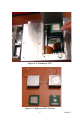
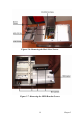
1. Remove the HDD-CDR bracket from the chassis and unlock the back
door, and then open it.(see fig. 2-4).
2. The CPU board will auto-detect CPU's voltage and frequency; there
are no jumper settings.
3. Open the CPU socket by pulling up the lever sideways from the socket,
then upwards at an angle of 90 degrees.
4. Insert the CPU with the correct orientation. The notched corner of the
CPU (with the white dot) should point toward the end of the lever. The
end of the lever is the blank area where one hole is missing from the cor-
ner of the square array of pin holes. An arrowhead printed on the mother-
board points to the end of the lever.
5. Slide the CPU in gently. It should insert easily. If not, pull the lever up
a little more and make sure the pins of the CPU correspond with the holes
of the socket. DO NOT USE EXCESSIVE FORCE!
6. Press the lever down. The plate will slide forward.
7. Place the heat sink on top of the CPU, and secure it with the heat sink
clip.
8. Connect the CPU's cooling fan power connector.
9. Then push the HDD-CDR bracket into the chassis.
Warnings Always disconnect the power cord from your panel
PC when you are working on it. Do not make con-
nections while the power is on, because sensitive
electronic components can be damaged by the
sudden rush of power. Only experienced electron-
ics personnel should open the panel PC.
Note: There are two different CPU FANs included in a
standard shipment.
Please refer to figure 2.5 to make sure CPU fan
is properly selected