
User`s manual

15 Chapter 2
2.2 Installing SDRAM
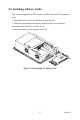
You can install from 128 to 512 MB (x2) of SDRAM memory. The Panel
PC system provides one 168-pin DIMM (Double Inline Memory Module)
socket, and supports 3.3 V SDRAM with a minimum speed of 12 ns.
1. Unlock the back door and open it.
2. Push the two white eject levers on each side of the DIMM outward
until they are separated from the black vertical posts.
3. Insert the memory module into the socket at an angle of 90 degrees.
4. Push the two eject levers toward the vertical posts at each end of the
socket until the module is upright.
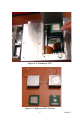
Figure 2.3: Installing SD-RAM