
User manual





19 PCM-9342 User Manual
Chapter 3 BIOS Operation
3.2.1 Main Menu
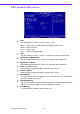
Press <Del> to enter AwardBIOS CMOS Setup Utility, the Main Menu will appear on
the screen. Use arrow keys to select among the items and press <Enter> to accept or
enter the sub-menu.
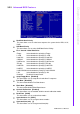
Standard CMOS Features
This setup page includes all the items in standard compatible BIOS.
Advanced BIOS Features
This setup page includes all the items of Award BIOS enhanced features.
Advanced Chipset Features
This setup page includes all the items of Chipset configuration features.
Integrated Peripherals
This setup page includes all onboard peripheral devices.
PC Health Status
This entry displays the current system temperature, and Voltage.
Load Optimized Defaults
This setup page includes Load system optimized value, and the system would
be in best performance configuration.
Set Password
Establish, change or disable password.
Save & Exit Setup
Save CMOS value settings to CMOS and exit BIOS setup.
Exit Without Saving
Abandon all CMOS value changes and exit BIOS setup.