
User manual




13 PCM-9342 User Manual
Chapter 2 H/W Installation
Supplies main power to the PCM-9342 (+5 V), and to devices that require +12 V.
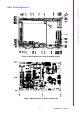
2.2.2.14 GPIO (General Purpose Input Output) (CN32)
The board supports 8-bit GPIO through GPIO connector. The 8 digital in and out-puts
can be programmed to read or control devices, with input or output defined. The
default setting is 4 bits input and 4 bits output.
2.2.2.15 Keyboard and PS/2 mouse connector (CN34)
The board provides a keyboard connector that supports both a keyboard and a PS/2
style mouse. In most cases, especially in embedded applications, a keyboard is not
used. If the keyboard is not present, the standard PC/AT BIOS will report an error or
fail during power-on self-test (POST) after a reset. The product’s BIOS standard
setup menu allows you to select “All, But Keyboard” under the “Halt On” selection.
This allows no-keyboard operation in embedded system applications, without the
system halting under POST.
2.2.2.16 Solid State Disk
The board provides a CompactFlash card type I/II socket.
CompactFlash (CN35)
The CompactFlash card shares a secondary IDE channel which can be
enabled/disabled via the BIOS settings.
Compact Flash set as fix master mode.
2.2.2.17 Power & HDD LED Indicator (D1)
The HDD LED indicator for hard disk access is an active low signal (24mA sink rate).
Power supply activity LED indicator.
2.2.2.18 Power Reset button (SW1)
Momentarily pressing the reset button will activate a reset. The switch should be
rated for 10 mA, 5 V.