
User manual




PCM-4153 User Manual 40
6.1 Introduction
The board is equipped with a high performance 32-bit Ethernet chipset which is fully
compliant with IEEE 802.3 100 Mbps CSMA/CD standards. It is supported by major
network operating systems. With 100Base-T compatible. The network boot feature
can be utilized by incorporating the boot ROM image files for the appropriate network
operating system. The boot ROM BIOS files are combined with system BIOS, which
can be enabled/disabled in the BIOS setup.
6.2 Installation of Ethernet driver
Before installing the Ethernet driver for Intel 82551ER chipset, note the procedures
below. You must know which operating system you are using with your board, and
then refer to the corresponding installation flow chart, just follow the steps described
in the flow chart..
6.2.1 Installation for Windows XP
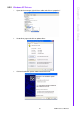
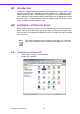
1. Select "Start", "Settings". "Control Panel".
2. Double click "Network".
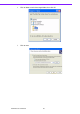
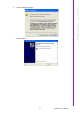
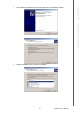
Note! The windows illustrations in this chapter are examples only. Follow the
steps and pay attention to the instructions which appear on your screen.