
User manual



PCM-4153 User Manual 20
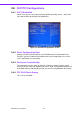
3.8 PnP/PCI Configurations
3.8.1 PnP OS Installed
Select Yes if you are using a plug and play capable operating system. Select No if
you need the BIOS to configure non-boot device
3.8.2 Reset Configuration Data
Default is Disable. Select Enable to reset Extended System Configuration Data
(ESCD) if you have installed a new add-on and system configuration has caused
such a conflict that OS cannot boot.
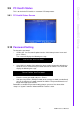
3.8.3 Resources Controlled by:
The commands here are “Auto” or “Manual.” Choosing “manual” requires you to
choose resources from each following sub-menu. “Auto” automatically configures all
of the boot and Plug and Play devices but you must be using Windows 95 or above.
3.8.4 PCI/VGA Palette Snoop
This is left at “Disabled.”
Figure 3.4: PnP/PCI configurations screen