
User manual



17 PCM-4153 User Manual
Chapter 3 Award BIOS Setup
3.6 Integrated Peripherals
3.6.1 IDE Master/Slave PIO/UDMA Mode,
IDE Master/Slave PIO/UDMA Mode (Auto) has a master and a slave, making two
IDE devices possible. Because each IDE device may have a different Mode timing
(0, 1, 2, 3, 4), it is necessary for these to be independent. The default setting “Auto”
will allow auto detection to ensure optimal performance.
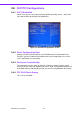
3.6.2 Integrated peripherals screen
3.6.3 Onboard LAN Control
Options are Enable or Disable. Select Disable if user does not want to use onboard
LAN controller1
3.6.4 IDE HDD Block Mode
You can enable the Primary IDE channel and/or the Secondary IDE channel. Any
channel not enabled is disabled. This field is for systems with only SCSI drives.
3.6.5 Onboard Serial Port
For settings reference the Appendix for the serial resource allocation,
and Disabled for the on-board serial connector
3.6.6 Onboard Parallel Port
This field sets the address of the onboard parallel port connector. You can select
either 3BCH/IRQ7, 378H/IRQ7, 278H/IRQ5 or Disabled. If you install an I/O card with
a parallel port, make sure there is no conflict in the address assignments. The CPU
card can support up to three parallel ports, as long as there are no conflicts for each
port.
3.6.7 Parallel Port Mode
This field allows you to set the operation mode of the parallel port. The setting “Nor-
mal” allows normal speed operation, but in one direction only. “EPP” allows bidirec-
tional parallel port operation at maximum speed. “ECP” allows the parallel port to
operate in bi-directional mode and at a speed faster than the maximum data transfer
rate. “ECP + EPP” allows normal speed operation in a two-way mode.