
User's Manual





EKI-6331AN_User Manual_for NCCPage27
Site Survey
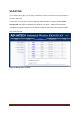
Under wireless client mode, EKI-6331AN is able to perform site survey, through which, information on
the available access points will be detected.
Open “Basic Settings” in “Wireless”, by clicking the “Site Survey” button beside “Wireless Mode”
option, the wireless site survey window will pop up with a list of available wireless networks around.
Select the AP you would like to connect and click “Selected” to establish connection.
Figure 23 Site Survey
VAP Profile Settings
Available in AP mode, EKI-6331AN allows up to 16 virtual SSIDs on a single BSSID and to configure
different profile settings such as security and VLAN ID to each SSID.
To create a virtual AP, you may
check the Enable box of the profile and click on the profile (eg. Profile 2) to configure wireless and
security settings. Hit Apply to active the profile.