
User's Manual





53 EKI-1351/EKI-1352/EKI-1521/1522/1524 User Manual
Chapter 3 Configuring Serial Device Server
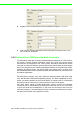
Data Mode: there are two major operation modes: Data Mode and Control
Mode. Using TCP server operating mode, you have to select Data Mode.
Data Listen Port: The port number represents the source port number, and the
number is used to identify the channel for remote initiating connections. Range:
1024-65533. If an unknown caller wants to connect to the system and asks for
some services, they need to define the port to carry a long-term conversation.
Each node on a TCP/IP network has an IP address, and each IP address can
allow connections on one or more TCP port. The well known TCP port are those
that have been defined; for example, port 23 is used for Telnet connections.
There are also custom sockets that users and developers define for their spe-
cific needs. Each port has its own data listen port to accept connected request
of other network device. So, the data listen port can’t be set the same value.
You can transmit/receive data to/from device via the data listen port.
Command Listen Port: Each port has its own command listen port to accept
connected request of other network device. So, the command listen port can’t
be set the same value. You can use ‘AT command’ to change the port setting
via the command listen port. The Command Listen Port must be different from
the Data Listen port.
Enable Data Idle Timeout: The default is 60 seconds. If you want to keep con-
nection continually, you might disable this function. Data idle Time is the time
period in which the device waits for data. If the EKI serial device server does not
receive data over an established idle time, the device server will disconnect
temporarily.