
User's Manual





EKI-1351/EKI-1352/EKI-1521/1522/1524 User Manual 52
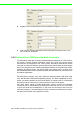
Round-Robin mode: enabling “Response Timeout” parameter, the EKI serial
device servers will operate in “Round-Robin mode”. Each serial port supports up
to five simultaneous connections, so multiple hosts can transmit/receive data to/
from the same serial port simultaneously. Every host can transmit data to the
same serial port simultaneously, but EKI serial device server will process the
data communication in order. EKI serial device server will process the first
host’s request and reply the response to the first host. EKI serial device server
can determine the end of the serial acknowledgement via response timeout.
When EKI serial device server receives nothing from serial port after the setting
of response timeout, the device will reply the acknowledgement to the host and
then process the next host’s request. while the connected hosts are more and
“Response Timeout” is long, the process time is much longer.
Frame Break is a very import parameter for Round Robin mode. This parameter
is the smart way to reduce inefficient waiting time and EKI serial device server
can transmit data more efficiently. Disabling the Frame Break function, EKI
serial device server will wait “Response Timeout” period, whether the device
have transmitted the data. During this period, the commands from hosts will be
queued and EKI serial device server just processes this command. Enabling
“Frame Break”, if the serial port idle is longer than the “Frame Break” period, EKI
serial device server will assume the communication is completed and continue
the next host’s query. This is an efficient way to reduce the waiting time and
improve the performance.
Some of Advance Settings parameter is especial for Modbus/RTU communication. In
general, EKI serial device is suitable for Modbus/RTU protocol. If there is a communi-
cation issue between Modbus/RTU, you might try to set these parameters to fulfill the
Modbus/RTU needs.
Delay Time:<< not yet >>
Purge:<< not yet>>
Character Timeout Detection: << not yet>>
Multiple connections: Disabling multiple connections that this serial don’t sup-
port hosts mulit-Access.
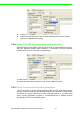
3.4.3 Setting TCP/UDP Server operating mode parameters
EKI serial device server provides various operating mode. Select the operation
mode: USDG Mode to switch to TCP server/client or UDP mode. Before setting the
TCP server mode, you have to check the serial port setting first.