
User's Manual





EKI-1351/EKI-1352/EKI-1521/1522/1524 User Manual 50
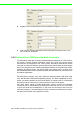
Stopbits :The EKI serial device servers provide three options: 1, 1.5 or 2.
Flow Control: The EKI serial device servers provide four options: None, Xon/
Xoff, RTS/CTS, DTR/DSR.
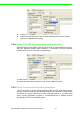
3.4.2 Setting Virtual COM Operating Mode Parameters
The Advantech serial device servers extend traditional COM ports of a PC to Ether-
net access. Through Ethernet networking, users can control and monitor remote
serial devices and equipment over LAN or WAN. Advantech serial device servers
come with a COM port redirector (Virtual COM driver) that transmits all serial signals
intact. This means that your existing COM-based software can be preserved, without
modifying to fulfill the needs. The Virtual COM mode allows user to continue using
RS-232/422/485 serial communications software that was written for pure serial com-
munication applications.
EKI serial device servers come with COM port redirector(virtual COM driver) that
work with Window NT/2000/XP/Vista(X86) systems. The driver establishes a trans-
parent connection between host and serial device by mapping the IP of Advantech
serial device server serial port to a local COM port on the host computer.
EKI serial device server provides Multi-access function through one Ethernet
connection path or dual Ethernet connection path. Allow the max. of five connections
to open one serial port simultaneously. In the mode, all connection have to use the
same serial setting. If one serial setting of these connections is different from others,
the data communication may operate incorrectly.