
User's Manual





EKI-1351/EKI-1352/EKI-1521/1522/1524 User Manual 46
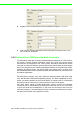
Index: This lists the supported encryption keys that you can choose from
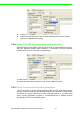
3.3.2.4 Wireless Advanced
The tab identifies several parameters that are related to the 802.11b/g wireless net-
work. We strongly suggested the default settings are not changed unless necessary.
If you want to recovery to factory value, you click the “Reset to factory default value”.
3.3.2.5 Beacon Interval
In infrastructure networks, the access point periodically sends beacons. You can set
the beacon interval with the access point configuration screen. In general, the bea-
con interval is set to 100 ms, which provides good performance for most applications.
In ad hoc networks, there are no access points. As a result, one of the peer stations
assumes the responsibility for sending the beacon. After receiving a beacon frame,
each station waits for the beacon interval and then sends a beacon if no other station
does so after a random time delay. This ensures that at least one station will send a
beacon, and the random delay rotates the responsibility for sending beacons.
Alphanumeric Hexadecimal
64 bits Up to 5 random characters
on the keyboard
Up to 10 random hexadecimal
characters (0 ~ 9, a ~ f)
128 bits Up to 13 random characters
on the keyboard
Up to 26 random hexadecimal
characters (0 ~ 9, a ~ f)
Parameters Default Value Range
Beacon Interval 100 0~65535
RTS Threshold 2347 0~2347
Fragment Threshold 2346 256~2346
Preamble Long Long/Short