
User's Manual





EKI-1351/EKI-1352/EKI-1521/1522/1524 User Manual 54
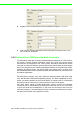
Protocol: TCP and UDP.
Enable Time sharing: this function is same as Mutli-Access function. Please
refer to the COM redirector setting.
3.4.4 Setting TCP/UDP Client operating mode parameters
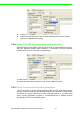
EKI serial device server allows connecting to the hosts or other serial device servers,
EKI-135x Wireless modules allow maximum 4 connections. EKI-152x Ethernet
modules allow up to 16 connections simultaneously.
In order to enable this function, you just insert IP and TCP port number of the hosts
and other EKI serial device servers into the “Peers to Receiving Data”
3.4.5 Setting Control operating mode parameters
The “Control mode” is a very special operating mode. The EKI serial device servers
present a modem interface to the attached serial device: it accepts AT-style modem
commands to connect / disconnect to other networking device. If you want serial
device running application program to connect/disconnect to different devices
dynamically, you can use controlling mode.