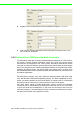
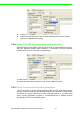
Chapter 3 Authentication Type: There are three kinds of types in this drop-down menu – Open system: No encryption for network communication. You can neglect the key setting on the right side. – WEP Share Key: Both communication devices use the same key as encryption. – Automatic: Detect the WEP situation of the access point automatically. EKI1351 and EKI-1352 will use the current key for encryption.
Alphanumeric Hexadecimal 64 bits Up to 5 random characters on the keyboard Up to 10 random hexadecimal characters (0 ~ 9, a ~ f) 128 bits Up to 13 random characters on the keyboard Up to 26 random hexadecimal characters (0 ~ 9, a ~ f) Index: This lists the supported encryption keys that you can choose from 3.3.2.4 Wireless Advanced The tab identifies several parameters that are related to the 802.11b/g wireless network. We strongly suggested the default settings are not changed unless necessary.
By increasing the beacon interval, you can reduce the number of beacons and associated overhead, but that will likely delay the association and roaming process because stations scanning for available access points may miss the beacons. You can decrease the beacon interval, which increases the rate of beacons. This will make the association and roaming process very responsive; however, the network will incur additional overhead and throughput will go down.
3.4.1 Setting serial port parameters Click on the “+” before the device name, and the utility will expand the interfaces on this device server. Select the one serial interface. Description: You can give a more detailed description on the function of the port for easier management and maintenance. Descriptions have a limit of 128 characters.
Chapter 3 Type: The EKI serial device servers offer three kinds of serial protocols, RS232, RS-422 and RS-485. You can use any of the three serial protocols according to your requirements. Baud Rate: The EKI serial device servers support baud rates from 50 to 921.6Kbps. Total throughput up to 1.2M bps Parity: The EKI serial device servers provide five options: None, Odd, Even, Space, Mark. Databit: The EKI serial device servers provide four options: 5, 6, 7 or 8.
Stopbits :The EKI serial device servers provide three options: 1, 1.5 or 2. Flow Control: The EKI serial device servers provide four options: None, Xon/ Xoff, RTS/CTS, DTR/DSR. 3.4.2 Setting Virtual COM Operating Mode Parameters The Advantech serial device servers extend traditional COM ports of a PC to Ethernet access. Through Ethernet networking, users can control and monitor remote serial devices and equipment over LAN or WAN.
Chapter 3 Host Idle Timeout: 10~255 second. The default vale is 10 second. The main purpose of Host Idle timeout is when the idle happens and continues more than the set value, the utility will cut off the connection between serial device servers and the host automatically. You must re-connect to recover the communication. EKI serial device server provides Multi-access function through one Ethernet connection path or dual Ethernet connection path. Allow the max.
Round-Robin mode: enabling “Response Timeout” parameter, the EKI serial device servers will operate in “Round-Robin mode”. Each serial port supports up to five simultaneous connections, so multiple hosts can transmit/receive data to/ from the same serial port simultaneously. Every host can transmit data to the same serial port simultaneously, but EKI serial device server will process the data communication in order.
Chapter 3 Data Mode: there are two major operation modes: Data Mode and Control Mode. Using TCP server operating mode, you have to select Data Mode. Data Listen Port: The port number represents the source port number, and the number is used to identify the channel for remote initiating connections. Range: 1024-65533. If an unknown caller wants to connect to the system and asks for some services, they need to define the port to carry a long-term conversation.
Protocol: TCP and UDP. Enable Time sharing: this function is same as Mutli-Access function. Please refer to the COM redirector setting. 3.4.4 Setting TCP/UDP Client operating mode parameters EKI serial device server allows connecting to the hosts or other serial device servers, EKI-135x Wireless modules allow maximum 4 connections. EKI-152x Ethernet modules allow up to 16 connections simultaneously.
Hangup Character: the default character is “+”. While EKI serial device server receive the character from serial port, the server cut off the connection. Guard Time: the default value is 1000ms. The following commands are available for EKI serial device severs. Command Function ATDT “Forms a TCP connection to the specified host. Ex: ATDT 192.0.55.22:5201 In above example, the EKI serial device server forms a raw TCP connection to the networking device (192.0.55.22).
3.4.6 Setting Serial Tunneling Operation Mode Parameters 3.5 Running Diagnostic Test 3.5.1 Port Status Screen 3.5.2 Running Port Connection Test 3.5.3 Checking Wireless Status 3.6 Fulfilling Administrator Functions 3.6.1 Securing Access Clients 3.6.2 Setting Access Control 3.6.
Chapter 4 Setting COM Redirector 4
4.1 Introduction Advantech Configuration Utility also creates virtual COM ports that Windows applications will use to communicate with remote serial devices on the serial server. Advantech virtual COM ports follow the same naming/numbering convention as Windows COM ports. 4.2 EDG Favorite Groups While you move the device(s) to the Favorite Group, you can use these functions Update firmware Auto Mapping Manual Mapping 4.2.
Chapter 4 The device server are grouped in EDG Device Favorites can setup the Virtual COM and upgrade the firmware. 59 EKI-1351/EKI-1352/EKI-1521/1522/1524 User Manual Setting COM Redirector After creating favorite group, you can select the device and hold the mouse button to move this device to the group.
4.2.2 4.1.
Advantech COM port mapping software is a serial COM port redirector that creates virtual COM ports and provides access to serial devices connected to Advantech serial device servers. Your serial device applications can communicate with serial devices connected to Advantech serial device servers without software changes.
The serial ports that can be assigned to virtual COM will be shown in this window. Select the serial ports you wish to map or click the
Chapter 4 Right click the serial device on the Favorite group and select the “Manual Mapping” function. Setting COM Redirector 4.3.2 Manual Mapping ADAM series, EDG series, and EKI wireless series have only one IP address. You select the serial port on the device server and the host COM that you want to set. Press
4.3.2.1 Auto Reconnect property Sometimes, the connection between EDG device and HOST is interrupted by network traffic or powered-off by accident. In such a situation, the host have to reconnect to Advantech serial device server. The function "Auto-reconnect" is for this purpose, If the Advantech serial server loses the connection to its host, the COM redirector will try to re-establish the connection while the host AP access the virtual COM port.
Chapter 4 Note Setting COM Redirector If you don’t use the redundant function, you just select the correct IP address in the IP address 1 field. if you set the wrong IP address, COM redirector will still try to connect the device. It might cause the system performance low or other issue.
www.advantech.com Please verify specifications before quoting. This guide is intended for reference purposes only. All product specifications are subject to change without notice. No part of this publication may be reproduced in any form or by any means, electronic, photocopying, recording or otherwise, without prior written permission of the publisher. All brand and product names are trademarks or registered trademarks of their respective companies. © Advantech Co., Ltd.