
User`s manual





Chapter 3: Installation and Configuration 43
3.4 Port Mapping Utility
The purpose of the port mapping utility is to help you manage all
ports which are in one Windows 95/98/NT/2000/ME/XP plat-
form. The utility displays three types of ports: Used ports, Un-
used ports and EDG Series ports. Please follow the steps.
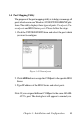
1. Click the UNUSED PORTS item and select the port which
you want to configure.
Figure 3-10 Unused ports
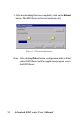
2. Click ADD button to assign the COMport to the specific EDG
Series.
3. Type IP address of the EDG Series and select ports.
Note: If you assigned different COMport to the same ADAM-
4570’s port. The dialog box will appear to remind you.