
User`s manual





Chapter 3: Installation and Configuration 41
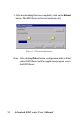
3.3 Status Messages
The status message shown at the bottom of the utility window
reflects the current status of EDG Series.
“Read”
The configuration utility has found the EDG Series and it is ready
for use.
“Searching EDG COMport”
The configuration utility is searching the EDG Series
“Querying DATA from EDG COMport”
The configuration utility is getting data from the EDG Series.
“Device Ready”
The EDG Series is ready to be configured and is now waiting for
acknowledgement from the device.
Figure 3-9 Status messages