
User Guide

Acrobat Forms - JavaScript Object Specification
42
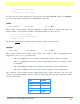
The following example sets the highlight property of a button to “invert”.
// set the highlight mode on button to invert
var f = this.getField("MyButton");
f.highlight = highlight.i;
lineWidth
Type: Integer Fields: All Access: R/W
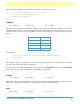
This property specifies the thickness of the border when stroking the perimeter of a field’s
rectangle. If the stroke color is transparent, this parameter has no effect except in the case of a
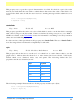
beveled border. You can set the lineWidth property in JavaScript by using the integer values
below:
For example:
// Change the border width of the Text Box to medium thickness
f.lineWidth = 2
The default value for lineWidth is 1 (thin). Any integer value can be used. However, values
beyond 5 may distort the field’s appearance.
In older versions of this specification, this property was
borderWidth
.Theuseof
borderWidth
is now discouraged but for backwards compatibility is still valid.
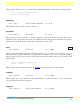
multiline
Type: Boolean Fields: Text Access: R
This read-only property determines how the text is wrapped within the field. Text fields can be
single line (clip to field boundaries) or multi-line (wrap to field boundaries).
name
Type: String Fields: All Access: R
Line Width Key Value
none 0
thin 1
medium 2
thick 3