
User Guide

Acrobat Forms - JavaScript Object Specification
38
borderStyle
Type: String Fields: All Access: R/W
This property specifies the border style for a field. Valid border styles include solid, dashed,
beveled, inset, and underline. The border style determines how the border for the rectangle is
drawn.
•Thesolid style strokes the entire perimeter of the rectangle with a solid line.
•Thedashed style strokes the perimeter with a dashed line.
•Thebeveled style is equivalent to the solid style with an additional beveled
(pushed-out appearance) border applied inside the solid border.
•Theinset style is equivalent to the solid style with an additional inset (pushed-in
appearance) border applied inside the solid border.
•Theunderline style strokes the bottom portion of the rectangle’s perimeter.
The border object is a static convenience constant that defines all the border styles of a field.
The following example illustrates how to set the border style of a field to solid:
var f = this.getField("MyField");
f.borderStyle = border.s; /* border.s evaluates to "solid" */
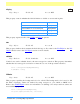
The following chart defines the borderStyle property and its associated keywords:
calcOrderIndex
Type: Integer Fields: Text, Combo Box Access: R/W
Use this property to change the calculation order of fields in the document. When a computable
Text or Combo Box field is added to a document, it is added to the end of the document and the
field’s name is placed in the calculation order array.Thecalculation order array determines
the order fields are calculated in the document (see Event Processing for more information
about calculation order arrays). The calcOrderIndex property works similarly to the Calculate
tab used by the Acrobat Exchange Form tool. Note the following example:
Type Keyword
solid border.s
beveled border.b
dashed border.d
inset border.i
underline border.u