
User Guide

Acrobat Forms - JavaScript Object Specification
11
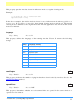
This property puts the Acrobat viewer in fullscreen mode vs. regular viewing mode.
Example:
// on mouse up, set to fullscreen mode
app.fullscreen = true;
In the above example, the Adobe Acrobat viewer is set to fullscreen mode when app.fullscreen
is set to true.Ifapp.fullscreen was false then default viewing mode would be set. The default
viewing mode is defined as the original mode the Acrobat application was in before full screen
mode was initiated.
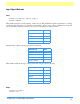
language
Type: String Access: R
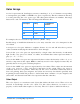
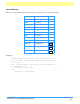
This property defines the language of the running Acrobat Viewer. It returns the following
strings:
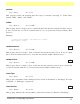
numPlugIns
Type: Number Access: R
This property indicates the number of plug-ins that have been loaded by Acrobat. See also the
getNthPlugInName method.
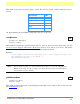
openInPlace
Type: Number Access: R/W
This property determines whether cross-document links are opened in the same window or
opened in a new window.
String Language, Country
DEU German, Germany
ENU English, The United States of America
ESP Spanish, Spain
FRA French, France
ITA Italian, Italy
JPN Japanese, Japan
NLD Dutch, The Netherlands
SVE Swedish, Sweden
4.0
4.0