
Operation Manual




525
Color management
Last updated 4/7/2015
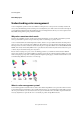
A Profiles describe the color spaces of the input device and the document. B Using the profiles’ descriptions, the color management system
identifies the document’s actual colors. C
The monitor’s profile tells the color management system how to translate the document’s numeric values
to the monitor’s color space. D
Using the output device’s profile, the color management system translates the document’s numeric values to the
color values of the output device so the correct appearance of colors is printed.
About monitor calibration and characterization
Profiling software can both calibrate and characterize your monitor. Calibrating your monitor brings it into compliance
with a predefined standard—for example, adjusting your monitor so that it displays color using the graphics arts
standard white point color temperature of 5000° K (Kelvin). Characterizing your monitor simply creates a profile that
describes how the monitor is currently reproducing color.
Monitor calibration involves adjusting the following video settings:
Brightness and contrast The overall level and range, respectively, of display intensity. These parameters work just as
they do on a television. A monitor calibration utility helps you set an optimum brightness and contrast range for
calibration.
Gamma The brightness of the midtone values. The values produced by a monitor from black to white are nonlinear—
if you graph the values, they form a curve, not a straight line. Gamma defines the value of that curve halfway between
black and white.
Phosphors The substances that CRT monitors use to emit light. Different phosphors have different color
characteristics.
White point The color and intensity of the brightest white the monitor can reproduce.
Calibrate and profile your monitor
When you calibrate your monitor, you are adjusting it so it conforms to a known specification. Once your monitor is
calibrated, the profiling utility lets you save a color profile. The profile describes the color behavior of the monitor—
what colors can or cannot be displayed on the monitor and how the numeric color values in an image must be converted
so that colors are displayed accurately.
1 Make sure your monitor has been turned on for at least half an hour. This gives it sufficient time to warm up and
produce more consistent output.