
Operation Manual







470
Print production tools (Acrobat Pro DC)
Last updated 4/7/2015
You can also access the Object Inspector from the Preview section of the Output Preview dialog box to inspect the
content of your document. For more information, see
View information about the content of a PDF document.
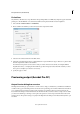
Output Preview also includes access to the complete Ink Manager for remapping spot-color inks in both printing and
previewing. Ink mapping for previewing only applies when the Output Preview dialog box is open.
Note: If you are using a color management system (CMS) with accurately calibrated ICC profiles and have calibrated your
monitor, the onscreen separation preview colors more closely match the final color separation output.
More Help topics
About color profiles
About monitor calibration and characterization
About soft-proofing colors
Open the Output Preview dialog box
1 Choose To o ls > Print Production.