
Operation Manual



357
Printing
Last updated 4/7/2015
Print to file
You can create a device-dependent PostScript file of a document. The resulting file contains code for enabling and
controlling specific device features, making it less compatible with devices other than the target device. For better
results when creating PostScript files, use Save As Other > More Options > PostScript.
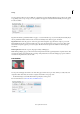
• Click the Advanced button, select Print To File, then click OK.
Options in the Print dialog box
Most options in the Acrobat Print dialog box are the same as other applications. However, some options vary depending
on the printer and what you've selected to print.
Comments & Forms
The Comments & Forms options control which visible content prints.
Document Prints the document contents and form fields.
Document And Markups Prints document contents, form fields, and comments.
Document And Stamps Prints the document, form fields, and stamps, but no other markups, such as note comments
and pencil lines.
Form Fields Only Prints interactive form fields but doesn’t print document contents.
Summarize Comments Creates a separate, printable PDF of the comments in a document. This option is unavailable
when you print from a web browser or print multiple documents in PDF Portfolios.
Pages to Print
The Pages To Print options specify the pages or range of pages to print.