
Operation Manual




218
Combining files
Last updated 4/7/2015
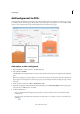
3 Under Margin Controls, select Remove White Margins.
4 To remove white margins from additional pages, set the page range or click All under Page Range.
Undo cropping
Cropping a PDF does not reduce file size because information is merely hidden, not discarded. By resetting the page
size, you can restore the page and its content to its original condition.
1 Open the Set Page Boxes dialog box by choosingCrop Pages from the options menu in the Page Thumbnails
panel of the navigation pane.
2 Click the Set To Zero button to reset the margins to the original page dimensions.
• Edit text in PDFs
• Edit images or objects in a PDF
More Help topics
Add watermarks to PDFs
A watermark is text or an image that appears either in front of or behind existing document content, like a stamp. For
example, you could apply a “Confidential” watermark to pages with sensitive information. You can add multiple
watermarks to one or more PDFs, but you must add each watermark separately. You can specify the page or range of
pages on which each watermark appears.
Note: Unlike a stamp, a watermark is integrated into PDF pages as a fixed element. A stamp is a type of PDF comment,
which others reading the PDF can open to display a text annotation, move, change, or delete.