
Specifications




NuPRO BIOS Users Manual • 5
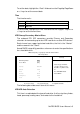
The Capacity item automatically adjust according to the configuration.
Drive A / Drive B
These fields identify the types of floppy disk drive A or drive B that has been
installed in the computer. The available specifications are:
None No floppy drive be installed
360KB 5.25 in. 5.25 inch floppy drive, 360KB capacity
1.2MB 5.25 in. 5.25 in. floppy drive, 1.2MB capacity
720KB 3.5 in. 3.5 in. floppy drive, 720KB capacity
1.44MB 3.5 in.
<Default>
3.5 in. floppy drive, 1.44MB capacity
2.88MB 3.5 in. 3.5 in. floppy drive, 2.88MB capacity
Video
This field selects the type of video display card installed in your system.
You can choose the following video display cards.
EGA/VGA
<Default>
For EGA, VGA, SEGA, SVGA or PGA monitor
adapters.
CGA 40 Power up in 40 column mode.
CGA 80 Power up in 80 column mode.
MONO For Hercules or MDA adapters.
Halt On
This field determines whether the system will halt if an error is detected
during power up.
No Errors
The system
boot will not be halted for any error that
may be detected.
All Errors
Whenever the BIOS detects a non-fatal error, the
system will stop and you will be prompted.
All, But Keyboard
<Default>
The system boot will not be halted for a keyboard
error; it will stop for all other errors
All, But Diskette
The system boot will not be halted for a disk error;
it will stop for all other errors.
All, But Disk/Key
The system boot will not be halted for a keyboard
or disk error; it will stop for all others.