
Specifications




4 • NuPRO BIOS Users Manual
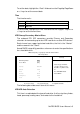
CMOS Setup Utility – Copyright (C) 1984-2001 Award Software
IDE Primary Master
IDE HDD Auto-Detection [Press Enter]
Item Help
IDE Primary Master [Auto] Menu Level
Access Mode [Auto]
Selects the type of fixed disk.
*Capacity 6480 MB ‘User type’ will let you select
the number of cylinders, heads,
*Cylinder 12556 etc.
*Head 16 Note: PRECOMP=65535
*Precomp 65535 means NONE !
*Landing Zone 12556
*Sector 63
á â à ß : Move Enter : Select +/-/PU/PD : Value F10 : Save ESC : Exit F1 : General Help
F5 : Previous Values F6 : Fail-Safe Defaults F7 : Optimized Defaults
IDE Primary/Secondary Master/Slave
Auto <Default> BIOS will auto detect the hard disk type.
Manual User can assigns the type of hard disk when the access
mode is normal.
None Selects this selection when there is no hard disk in the
system.
Access Mode
Auto <Default>
Auto-detect the HDD mode
Normal HD < 528MB
Large For MS-DOS only
LBA HD > 528MB and supports Logical Block Addressing
If your hard disk drive type is not matched or listed, you can use normal
access mode to define your own drive type manually. If you select normal
access mode, related information is asked to be entered to the following
items.
Cylinder Number of cylinders
Head Number of read/write heads
Precomp Write precompensation
Landing Zone Landing zone
Sector Number of sectors
NOTE: The specifications of your drive must match with the drive table.
The hard disk will not work properly if you enter incorrect
information in these fields.
Detecting Hard Drive…