
Specifications





14 • NuPRO BIOS Users Manual
differ in timing. When Auto is selected, the BIOS will select the best
available mode.
Auto<Default> Auto select which mode that BIOS
communicates with the controller and CPU
Mode0~Mode4 User define the PIO mode
IDE Primary/Secondary Master/Slave UDMA
These fields allow your system to improve disk I/O throughput to
33Mb/sec with the Ultra DMA/33 feature. Intel 815E chipset supports up to
ATA100 feature. The options are Auto<Default> and Disabled.
USB Controller
Select Enabled if your system contains a Universal Serial Bus (USB)
controller and you have USB peripherals. The default is Enabled.
USB Keyboard Support
Select Enabled if your system contains a Universal Serial Bus (USB)
controller and you want to use a USB keyboard under DOS environment.
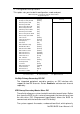
Init Display First
This item allows you to decide to activate whether PCI Slot or on-chip VGA
first. The default is PCI Slot.
AC97 Audio
NuPRO-780 support an optional AC97 Audio module. User can decide to
add an AC97 module on NuPRO-780 board. When setting is Auto, BIOS
will auto detect the codec of AC97 and configures it if there has an AC97
module.
Onboard 82559 Lan Chip
NuPRO-780 has a function that can enable/disable the onboard 82559
Lan chip to decide if you want to use two Lans or not. The default is
Enabled.
IDE HDD Block Mode
This field allows your hard disk controller to use the fast block mode to
transfer data to and from your hard disk drive.
Enabled<Default> IDE controller uses block mode
Disabled IDE controller uses standard mode