
Specifications





10 • NuPRO BIOS Users Manual
4. Advanced Chipset Features
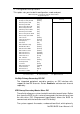
This Setup menu controls the configuration of the chipset.
CMOS Setup Utility – Copyright (C) 1984-2001 Award Software
Advanced Chipset Features
SDRAM CAS Latency Time [Auto]
SDRAM Cycle Time Tras/Trc [Auto]
Item Help
SDRAM RAS-to-CAS Delay [Auto] Menu Level
SDRAM RAS Precharge Time [Auto]
System BIOS Cacheable [Disabled]
Video BIOS Cacheable [Disabled]
Memory Hole At 15M-16M [Disabled]
CPU Latency Timer [Disabled]
Delayed Transaction [Enabled]
AGP Graphics Aperture Size [64MB]
Display Cache Frequency [100 MHz]
FWH Write Protection [Disabled]
On-Chip Video Window Size [64MB]
* Onboard Display Cache Setting *
CAS# Latency [3]
Paging Mode Control [Open]
RAS-to-CAS Override [by CAS# LT]
RAS# Timing [Fast]
RAS# Precharge Timing [Fast]
á â à ß : Move Enter : Select +/-/PU/PD : Value F10 : Save ESC : Exit F1 : General Help
F5 : Previous Values F6 : Fail-Safe Defaults F7 : Optimized Defaults
SDRAM CAS Latency Time
When synchronous DRAM is installed, the number of clock cycles of CAS
latency depends on the DRAM timing. The default is Auto.
SDRAM Cycle Time Tras/Trc
Select the number of SCLKs for an access cycle. The default setting is
Auto.
SDRAM RAS-to-CAS Delay
This field lets you insert a timing delay between the CAS and RAS strobe
signals, used when DRAM is written to, read from, or refreshed. This field
applies only when synchronous DRAM is installed in the system. The
default is Auto.
SDRAM RAS Precharge Time
If an insufficient number of cycles is a llowed for the RAS to accumulate its
charge before DRAM refresh, the refresh may be incomplete and the
DRAM may fail to retain data. The default is Auto.