
User`s guide




46 • Operation Theory
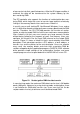
(UC _Counter=4, IC_Counter=3)
4 update counts, infinite iterations
DAWR
WFG_in_progress
Operation start
Trigger
Output Waveform
waveform generation
won’t
stop until software
stop function is
executed
0
2
4
Figure 27: Infinite iterative waveform generation with Post-trigger
and DLY2_Counter = 0
(Assuming the data in the data buffer are 2V, 4V, 2V, 0V)
Delay2 in iterative Waveform Generation
To stretch out the flexibility of the D/A waveform generation, we add a
DLY2 Counter to separate 2 consecutive waveforms in iterative waveform
generation. The time between two waveforms is assigned by setting the
value of DLY2_Counter. The DLY2_Counter counts down after a complete
waveform generation, and when it counts down to zero, the next waveform
generation will start. This DLY2_Counter is 16-bits wide and users can set
the delay time in the unit of Timebase (delay time =
DLY2_Counter/Timebase) or in the unit of update period (delay time =
DLY2_Counter * UI_Counter/Timebase), such that the delay time could
reach a wide range.
4.2.2.3 Stop Modes of Scan Update
You can call software stop function to stop waveform generation when it is
still in progress. Three stop modes are provided for timed waveform gen-
eration, which means when is it to stop the waveform generation. You can
apply these 3 modes to stop waveform generation no matter infinite or finite
waveform generation mode is selected.
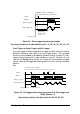
Figure 28 illustrates a n example for stop mode I, in this mode the waveform
stops immediately when software command is asserted.
In stop mode II, after a software stop command is given, the waveform
generation won’t stop until a complete single waveform is finished. See
figure 29 for an example, since UC_Counter is set to 4, the total DA up-
dates counts (that is, number of pulses of DAWR signal) must be a multiple
of 4 (update counts = 20 in this example).