
User`s guide



52
•
BIOS Configuration
Reload Global Timer Events
This section determines the reloading of the ‘timers’ after entering the Full
On You can enable or disable the monitoring of IRQ 8 (Real Time Clock) so
it does not awaken the system from Suspend mode.
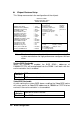
PM Events
The VGA, LPT & COM, HDD & FDD, DMA /master, PWR-On by
Modem/LAN, RTC Alarm Resume and Primary INTR section are I/O
events which can prevent the system from entering a power saving mode
or can awaken the system from such a mode. When an I/O device wants to
gain the attention of the operating system, it signals this by causing an IRQ
to occur. When the operating system is ready to respond to the request, it
interrupts itself and performs the service. If activity is detected from any
enabled IRQ channels, the system wakes up from suspended mode.
Panel Type Selectable
If there installs a LCD panel on the system, you can also select the panel
type in this item. There are 16 panel types can be selected.
Panel-16 1024x768 Dual Scan STN Color Panel
Panel-1 1280x1024 TFT Color Panel
Panel-2 640x480 Dual Scan STN Color Panel
Panel-3 800x600 Dual Scan STN Color Panel
Panel-4 640x480 Sharp TFT Color Panel
Panel-5
<Default>
640x480 18-bit TFT Color Panel
Panel-6 1024x768 TFT Color Panel
Panel-7 800x600 TFT Color Panel
Panel-8 800x600 TFT Color Panel (Large BIOS only)
Panel-9 800x600 TFT Color Panel (Large BIOS only)
Panel-10 800x600 Dual Scan STN Color Panel (Large BIOS
only)
Panel-11 800x600 Dual Scan STN Color Panel (Large BIOS
only)
Panel-12 1024x768 TFT Color Panel (Large BIOS only)
Panel-13 1280x1024 Dual Scan STN Color Panel (Large BIOS
only)
Panel-14 1024x600 Dual Scan STN Color Panel (Large BIOS
only)
Panel-15 1024x600 TFT Color Panel (Large BIOS only)