
Specifications




2-4 Initialization & Installation
2. 3. Install a New NuDAM to a Existing Network
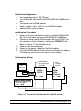
Equipments for Install a New Module
• A existing NuDAM network
• New NuDAM modules.
• Power supply (+10 to +30 V
DC
).
Installing Procedures
1. Configure the new NuDAM module according to the
initialization procedures in section 2.2.
2. The baud rate and check-sum status of the new module must
be identity with the existing RS-485 network. The address ID
must not be conflict with other NuDAM modules on the
network.
3. Power off the NuDAM power supply of the existing RS-485
network.
4. Power off the host computer.
5. Wire the power lines for the new NuDAM with the existing
network. Be careful about the signal polarity as wiring.
6. Wire the RS-485 data lines for the new NuDAM with the
existing network. Be careful about the signal polarity as wiring.
7. Wire to the input or output devices. Refer to section 2.4 for
illustrations.
8. Power on the host computer.
9. Power on the NuDAM local power supply.
10. Use the NuDAM administration utility to check entire network.