
Specifications




Initialization & Installation 2-3
Initialization Equipment
• Host computer with an RS-232 port.
• An installed RS-485 module (NuDAM-6520) with 9600 baud
rate.
• The brand new NuDAM module
• Power supply (+10 to +30 V
DC
) for NuDAM modules
• Administration utility software
Initialization Procedure
1. Power off the host computer and the installed NuDAM-6520.
Be sure of the baud rate of the NuDAM-6520 is 9600 bps.
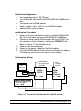
2. Connect a brand new NuDAM module with the RS-485. Set
the module in Default State by shorting the DEFAULT* pin.
Refer to Figure 2.1 for detailed wiring.
3. Power on the host computer.
4. Power on the power supply for NuDAM modules.
5. Use the NuDAM Administration utility to configure the address
ID, Baud rate and check-sum status of the module.
Initialization Wiring
Figure 2-1 Layout for Initialization the NuDAM module
Host
Computer
DATA +
DATA -
+Vs GND
DATA+
DATA -
Default*
+Vs GND
Local Power Supply
+10 V to +30 V
+Vs GND
New
NuDAM
module
NuDAM-6520
RS-232/RS-485
Converter
RS-232