
Specifications


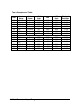


5-2 Calibration
5. Send “Span Calibration $(Addr)00” to analog input module ND-
6013 channel 0 .
6. Apply the correct offset resistance to the analog input module
ND-6013 channel 1, detail resistance value, see table 5-2
7. Send “Offset Calibration $(Addr)11” to analog input module ND-
6013 channel 1 .
8. Apply the correct span resistance to the analog input module ND-
6013 channel 1, detail resistance value, see table 5-2.
9. Send “Span Calibration $(Addr)01” to analog input module ND-
6013 channel 1 .
10. Apply the correct offset resistance to the analog input module
ND-6013 channel 2, detail resistance value, see table 5-2.
11. Send “Offset Calibration $(Addr)12” to analog input module ND-
6013 channel 2 .
12. Apply the correct span resistance to the analog input module ND-
6013 channel 2, detail resistance value, see table 5-2.
13. Send “Span Calibration $(Addr)02” to analog input module ND-
6013 channel 2 five times.
14. Repeat procedure 2 to procedure 13 two times.
Calibration Procedure for ND-6018 Firmware Rev B1.10
1. Disable all the channel and open detect function
2. Select the correct input range, different input range have
different apply calibration voltage.
3. Apply the correct offset voltage to channel 0, detail voltage
value, see table 5-1.
4. Send “Offset Calibration $(Addr)1” to analog input module
five times.
5. Apply the correct span voltage to channel 0, detail voltage value,
see table 5-1
6. Send “Span Calibration $(Addr)0” to analog input module
five times..
Repeat procedure 3 to procedure 6 two times
CJC Calibration Procedure
1. Ensure that the NuDAM units has been powered up for at least 30
minutes and is located away from sources of heat, in still air at
constant temperature.