
User`s manual

25
3.3.6 Switch And Jumper Settings
3.3.6.1 Set Blade Operation Mode
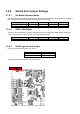
Use switch SW3 to set the Blade Operation Mode. Normal operation requires a shelf manager for the blade to
boot. Standalone mode allows the blade to boot without a shelf manager.
SW3 Blade Operation Pin 1 Pin 2 Pin 3 Pin 4
Normal Mode (default) OFF OFF OFF OFF
Standalone Mode OFF OFF ON OFF
3.3.6.2 IPMC JTAG Signal
The switch SW4 is designed for hardware debug purposes. Do not change the default settings. Doing may
result in an abnormal boot, failure to boot, and or damage to the board.
SW12 IPMC JTAG Pin 1 Pin 2 Pin 3 Pin 4
Default Setting OFF ON ON ON
3.3.6.3 Shelf/Logic Ground Jumper
Use JP2 to short Shelf Ground to Logic Ground.
Shelf/Logic GND JP2 Setting
Shorted 1-2
Open (default) 2-3
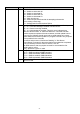
The locations of SW3, SW4 and JP2 are shown below:
JP2 SW3/4