
Product data

APCI-7xxx-3 Figures and Tables
8.2 Testing the board with the MTTTY program
RS422, RS232 and 20 mA Current Loop
♦ Install the program on your PC.
The program is delivered on the CD 1 “ADDI-DATA Standard Drivers”.
Under CD/MTTTY start the setup.exe file.
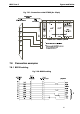
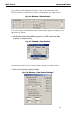
The following window appears:
Fig. 8-5: The MTTTY program
♦ Select the right COM interface under "Port".
♦ Connect it with "File/Connect".
If the shorting plug is connected, each key stroke (= data transmission) must result
in the corresponding key character displayed on the screen (= data reception). If
the test is successfully carried out, the board works.
Once the port is initialised the state of the "Modem Control Signals" can be read
in Modem Status. If the RTS signal is set, the CTS state is displayed under
Modem Status. For DTR the 3 other fields are set.
55