
Product data

APCI-7xxx-3 Figures and Tables
5.3 Plugging the board into the slot
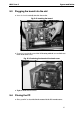
♦ Insert the board vertically into the chosen slot.
Fig. 5-2: Inserting the board
♦ Fasten the board to the rear of the PC housing with the screw which was
fixed on the back cover.
Fig. 5-3: Fastening the board at the back cover
♦ Tighten all the loosen screws.
5.4 Closing the PC
♦ Close your PC as described in the manual of the PC manufacturer.
25