
User`s guide

16
SlimSCSI 1480 User’s Guide
4
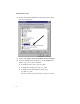
Double-click the System icon, then select the Device Manager
tab.
5
Double-click SCSI controllers. The driver for the SlimSCSI
adapter is listed as Adaptec APA-1480 CardBus UltraSCSI
Adapter.
■
If the driver is listed, this means it is loaded properly.
■
If the driver is listed but has an exclamation mark inside a
yellow circle, it is in a problem state (usually indicating a
conflict with other hardware using the same resources.)
■
If the driver is listed but has an ‘X’ inside a red circle, this
indicates that it is disabled and is not loading.
■
If the SCSI controllers icon or the APA-1480 CardBus driver
is not listed, reinstall the driver (see directions on page 5.)
Note:
Software upgrades (including downloadable drivers)
for Adaptec products are available on the Adaptec Web site
at http://www.adaptec.com
An “X” inside a red circle appears with the SlimSCSI 1480 software
driver in Device Manager. What does this mean?
It means that the software driver is disabled and is not loading. Fol-
low these steps to enable the driver:
1
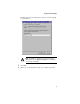
Double-click the SlimSCSI 1480 software driver in Device
Manager.
2
Under the General tab, check the Original Configuration (cur-
rent) box.
What if there is no SCSI controllers icon under Device Manager, or the
SlimSCSI 1480 software driver does not appear under Device
Manager?
If the SCSI controllers icon or the software driver does not appear:
1
Double-click the Add New Hardware icon in the Control
Panel.
2
Select Yes on the second screen of the Add New Hardware
Wizard to have Windows search for the SlimSCSI 1480.