
User`s guide

15
Troubleshooting
Windows 95 Troubleshooting
How do I determine if the Windows 95 socket is enabled and is running
correctly?
1
Insert the SlimSCSI 1480 in the CardBus slot.
2
Click the Start button and click Settings.
3
Click Control Panel.
4
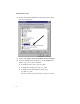
Double click the System icon, and then select the Device Man-
ager tab.
5
Double-click SCSI controllers. If APA-1480 CardBus is not
listed, double click Other Devices.
6
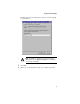
If PCMCIA Socket is not listed, or if it is listed but has a yellow
exclamation mark or a red X next to it, PCMCIA Socket has not
been loaded properly or is not configured properly. See your
Windows 95 documentation for more information.
When I start Windows 95, the system locks up when the Windows logo
is displayed. How can I get the system to start so I can verify that the
SlimSCSI 1480 is functioning normally?
1
Start or restart your PC, and view the onscreen messages.
2
When Starting Windows 95 appears, press and release F8 while
the text is on the screen.
3
From the menu that is displayed, select Safe Mode. (It may
take several minutes for Windows 95 to load.)
4
Verify that the SlimSCSI 1480 software driver is loading prop-
erly (see below).
How do I determine if the SlimSCSI Windows 95 miniport driver is
working correctly?
1
Insert the SlimSCSI 1480 into the CardBus slot, if it is not
already inserted.
2
Click the Start button and click Settings.
3
Click Control Panel.