
User Manual



receiving commands using a custom protocol we call SDEP (Simple Data Exchange Protocol).
An SDEP command is sent to the Feather lib, and a standard response is sent back and interpretted, allowing the two
binary blobs to exist entirely independent of each other, and be updated separately.
You normally never need to deal with SDEP commands directly since the commands are all hidden in the public WICED
Feather helper classes (AdafruitFeather, AdafruitHTTP, etc.). These helper classes and functions send the SDEP
commands for you, and convert the responses into meaningful data.
There is a special AdafruitSDEP helper class that allows you to send SDEP commands directly if the need does every
arise, though, and the SDEP commands are all documented elsewhere in this learning guide.
Flash Memory Layout
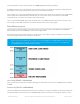
To keep things as simple as possible, and to make updates easy, the flash-memory and SRAM on the STM32F205
MCU is broken up into several Sections, as shown in the diagram below.
Keeping the sections independent allows you to update the user code without having to recompile and reflash the rest
of the system, significantly speeding up build and write times.
User Code (256KB + 20KB SRAM)
Your own code ('User Code') will be compiled directly by the Arduino IDE, and has access to 256KB of flash and 20KB
of SRAM.
Feather Lib (704 KB + 108KB SRAM)
The low level WiFi stack from Broadcom ('Feather Lib') is provided as a single pre-compiled .hex file that gets flashed to
a dedicated location in flash memory on the STM32F205 MCU. Because most of the heavy lifting is done here, it has
Earlier versions of the WICED Feather (<0.6.0) only reserved 128KB flash and 16KB SRAM for user code. If you
have an older board, just update your FeatherLib and reset the board to benefit from the new 256KB flash
and 20KB SRAM limit on FeatherLib 0.6.0 and higher.
© Adafruit Industries https://learn.adafruit.com/introducing-the-adafruit-wiced-feather-wifi Page 53 of 202