
User Manual




Optional: Updating the Bootloader
While you should never have to update the USB DFU bootloader on your WICED Feather, if you have a Segger J-
Link (https://adafru.it/e9G) or an STLink/V2 (http://adafru.it/2548) you can reflash the normally read-only bootloader
from within the Arduino IDE.
A J-Link or STLink is required since this is the only way to talk to the STM32F205 if the bootloader is somehow erased.
To reflash the bootloader hook the SWDIO, SWCLK, RESET and GND pins up to the pins of the same name on the
WICED Feather (see the JLink or STLink/V2 pinout to know where to find these pins on your debugger). If you are
using a JLink, make sure to also connect the VTRef pin to 3.3V on the WICED Feather since it needs to know the logic
level for the target device.
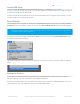
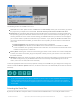
Select the appropriate debugger from the Tools > Programmer menu (only the J-Link or STLink options will work!):
© Adafruit Industries https://learn.adafruit.com/introducing-the-adafruit-wiced-feather-wifi Page 49 of 202