
User Manual

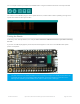


header rail)
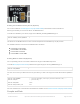
Connect SWDIO on the STLink to SWDIO on the WICED Feather
Connect GND on the STLink to GND on the WICED Feather
Connect RST on the STLink to RST on the WICED Feather
Power both the WICED Feather and STLink using USB
To connect a Segger J-Link to the WICED Feather:
Consult the Segger JLink SWD and SWO Pinout for your JLink
Connect SWCLK on the JLink to SWCLK on the WICED Feather (which is a single 0.1" hole off the main header
rail)
Connect SWDIO on the JLink to SWDIO on the WICED Feather
Connect GND on the JLink to GND on the WICED Feather
Connect VTRef on the JLink to 3V on the WICED Feather (important!)
Connect RST on the JLink to RST on the WICED Feather
Power both the WICED Feather and JLink using USB
From the Arduino IDE:
Make sure 'Tools > Boards' is set to 'Adafruit WICED Feather'
In 'Tools > Programmer' select either 'STLinkV2 with AdaLink' or 'JLink with AdaLink'.
Click the 'Tools > Burn Bootloader' menu entry, which shoud use AdaLink and either the STLink/V2 or JLink to
flash the bootloader on your board.
How can I flash the bootloader using AdaLink directly?
You can also flash the bootloader from the command-line using AdaLink directly.
Make sure AdaLink is properly setup on your system (see the readme file in the Github repo).
Find the bootloader.hex file in the bootloader folder.
Connect either a STLink/V2 or Segger JLink to your WICED Feather (see the FAQ entry above for connection
details)
With the debugger connected and both the debugger and WICED Feather powered, enter the following
command (adjusting the path to bootloader.hex if required):
For an STLink/V2:
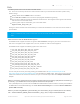
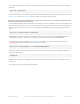
adalink stm32f2 -p stlink -h bootloader.hex
For a Segger JLink:
adalink stm32f2 -p jlink -h bootloader.hex
You can check if AdaLink is properly connected to the WICED Feather with the following commands:
For an STLink/V2:
adalink stm32f2 -p stlink -i
For a Segger JLink:
adalink stm32f2 -p jlink -i
I get 'OSError: [Errno 2] No such file or directory OSError: [Errno 2] No such file or directory' when trying to use
© Adafruit Industries https://learn.adafruit.com/introducing-the-adafruit-wiced-feather-wifi Page 199 of 202