
User Manual




Examples
The WICED Feather board support package includes a number of examples to help you get your project up and
running with a minimum of effort.
Accessing the Examples (Arduino 1.6.5)
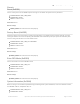
At present, the BSP installation is a manual process, as described in Get the WICED BSP earlier in this guide. To
access to examples contained in this BSP, you will need to use a different menu path than you normally would:
Accessing the Examples (Arduino >= 1.6.8)
Recent versions of the Arduino IDE (after the 1.6.5 release used during development of this BSP) have changed the
way examples sketches appear. On a newer version of the Arduino IDE (like 1.6.9), the WICED examples will no longer
appear in the 'File > Sketchbook' menu item.
To make the examples visible you must copy the contents of the `hardware/Adafruit_WICED_Arduino/examples` folder
to your local sketchbook folder under a WICED subdirectory, so something like: `sketchbook/WICED/examples'
Example Folders
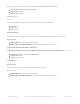
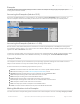
The examples are broken up into sub-folders to try to keep things organized, although the exact folder structure is
likely to evolve with time so it may not resemble exactly the image shown above.
As of the initial release, the following major folders are present:
Adafruit: This folder contains test code that makes use of some specific Adafruit hardware
AIO: Sketches making use of the Adafruit IO (https://adafru.it/fsU) servers
Hardware: Examples showing how to use the peripherals on the STM32F205 MCU
HTTP: Examples showing how to work with HTTP servers and data
MQTT: Examples showing how to work with MQTT brokers
TCP: Examples showing how to work with TCP sockets and connections
TLS: Examples showing how to work with secure TLS/SSL/HTTPS TCP connections
UDP: Examples related to UDP sockets and connections
WiFi: General purpose wireless examples for the WICED Feather
stm32: This folder contains libraries that are part of the WICED Feather BSP
Making Modifications to the Examples
One side effect of the examples being located outside of the normal examples structure is that any changes you make
© Adafruit Industries https://learn.adafruit.com/introducing-the-adafruit-wiced-feather-wifi Page 176 of 202