
User Manual





HTTPResource Records
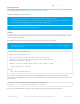
Looking at the example above, we can see that three static files were converted to headers and HTTPResource
records ('d3.min.js', 'favicon.ico', and 'index.html').
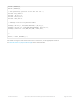
Each output header file contains a single HTTPResource , which has the binary equivalent of the file encoded inside it.
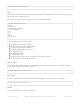
For example, for favicon_ico.h we get a 10990 byte long HTTPResource named favicon_ico , shown below:
HTTPResource Collection: resources.h
The tool will also generate a single header file named resources.h, which is the only file that you need to reference in
your sketch.
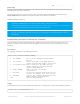
The resources.h file lists all of the HTTPResource records available, and you can then insert these resources into a
page collection for your sketch, adding them to the AdafruitHTTPServer (https://adafru.it/qoE) individually or as a list.
The tool will attempt to automatically determine the MIME type for the file based on the file extension, selecting from
the list of MIME types supported by FeatherLib.
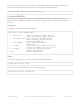
Using the example from above, we would get the following content in resources.h from D3Graphic:
Looking for files in 'resources'
Converted 'resources/d3.min.js' to '_d3_min_js.h'
Converted 'resources/favicon.ico' to 'favicon_ico.h'
Converted 'resources/index.html' to 'index_html.h'
Wrote resource index to 'resources.h'
/* Auto-generated by pyresource. Do not edit this file. */
const uint8_t favicon_ico_data[10990] = {
0x00, 0x00, 0x01, 0x00, 0x03, 0x00, 0x10, 0x10, 0x00, 0x00, 0x01, 0x00, 0x08,
0x00, 0x68, 0x05, 0x00, 0x00, 0x36, 0x00, 0x00, 0x00, 0x20, 0x20, 0x00, 0x00,
// ... data removed for brevity ...
0x00, 0x00, 0x00, 0x00, 0x00, 0x00, 0x00, 0x00, 0x00, 0x00, 0x00, 0x00, 0x00,
0x00, 0x00, 0x00, 0x00, 0x00
};
const HTTPResource favicon_ico(favicon_ico_data, 10990);
© Adafruit Industries https://learn.adafruit.com/introducing-the-adafruit-wiced-feather-wifi Page 164 of 202