
User Manual





pyresource.py
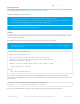
This tool will recursively scan the contents of a folder, and convert any files found into ' HTTPResource ' entries that can
be used with modules like the AdafruitHTTPServer (https://adafru.it/qoE).
Location: /tools/pyresource/pyresource.py
Usage
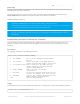
This tool accepts a single argument: the path to the folder where the files you wish to convert (recursively) are stored,
relative to the current directory.
All HTTPResource header files will be written to the folder that the script is executed from.
As an example, if you place all of your static files in the 'resources' folder of your Arduino sketch, and you wish to
generate a set of HTTPResource records in the main sketch folder (one level higher than resources) you would run the
tool as follows:
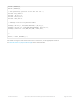
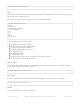
Assuming the same D3Graphic example mentionned above, this would generate the following output:
On Windows, the BSP package that contains the tools folder is normally found in the
'%APPDATA%\Arduino15\packages\adafruit\hardware\wiced\0.6.0' folder. On OS X it can usually be found in
the '~/Library/Arduino15/packages/adafruit/hardware/wiced/0.6.0' folder.
This tool was added in version 0.6.0 of FeatherLib
Note that when using this tool folder separators ('/' or '\') will be converted to '_dir_' and spaces and periods
will be converted to '_'.
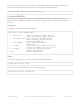
Usage: pyresource.py [OPTIONS] DIR
Adafruit Python HTTP Resource Tool
This tool recursively converts the folder contents into HTTP server
resources in a C header format. These headers can then be imported into
WICED Feather HTTP server sketches.
Example of recursively converting the contents of the 'resources' folder:
$ python pyresource.py resources
Options:
--help Show this message and exit.
# Run from 'libraries/AdafruitWicedExamples/HTTPServer/D3Graphic'
$ python ../../../../tools/pyresource/pyresource.py resources
© Adafruit Industries https://learn.adafruit.com/introducing-the-adafruit-wiced-feather-wifi Page 163 of 202