
User Manual




WICED Feather Client Code
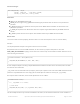
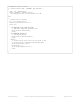
Note that at present .begin in the WICED Feather library returns a bool, not a status byte (as in the WiFi example
above), so the example has been modified slightly to detect connection status via
the .connected (https://adafru.it/lFn) function that is also part of the Client (https://adafru.it/lFj) interface.
3. Change WiFiUDP and WiFiTCP Class Types
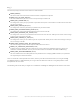
If your example uses classes like WiFiUDP and WiFiTCP, simple replace the class names with AdafruitUDP or
AdafruitTCP.
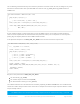
Existing WiFiUDP Class
Updated AdafruitUDP Class
The UDP and TCP classes should generally be compatible with each other, so simply changing the class type and
using the same field name should solve 90% of your problems.
The Adafruit WICED Feather API is still a work in progress and we're trying to make the transition to the
WICED as easy as possible, but there may be some implementation differences between platforms. Hopefully
these will be addressed over time.
// Attempt to connect to Wifi network
while (!Feather.connected()) {
Serial.print("Attempting to connect to SSID: ");
Serial.println(ssid);
// Connect to any network.
// The Feather stack will try to determine the network
// security type automatically
bool results = Feather.begin(ssid, pass);
// Optional: wait a bit before checking for a connection
delay(3000);
}
// A UDP instance to let us send and receive packets over UDP
WiFiUDP Udp;
// A UDP instance to let us send and receive packets over UDP
AdafruitUDP Udp;
© Adafruit Industries https://learn.adafruit.com/introducing-the-adafruit-wiced-feather-wifi Page 157 of 202