
User Manual

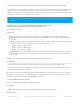


Returns: 'True' (1) if the publish was successful, otherwise 'false' (0) if an error occured (check .errno, .errstr, etc.).
bool subscribe ( const char* topicFilter, uint8_t qos, messageHandler mh);
Subscribes to a specific topic, using a callback mechanism to alert you when new data is available on the specific
topicFilter.
Parameters:
topicFilter: The topic name or topic 'filter' to subscribe to. This can be either a single topic
("home/kitchen/fridge/temp") or make use of a standard MQTT wildcard like "home/+", which will subscribe to
changes to any topic above the 'home/' level.
qos: A subscribing client can set the maximum quality of service a broker uses to send messages that match the
client subscriptions. The QoS of a message forwarded to a subscriber thus might be different to the QoS given to
the message by the original publisher. The lower of the two values is used to forward a message. The value
of qos can be one of:
MQTT_QOS_AT_MOST_ONCE
MQTT_QOS_AT_LEAST_ONCE
MQTT_QOS_EXACTLY_ONCE
mh: The MQTT subscribe callback function that will handle callback events (see Subscribe Callback
Handler below for details).
Returns: 'True' (1) if the subscribe was successful, otherwise 'false' (0) if an error occured (check .errno, .errstr, etc.).
Subscribe Callback Handler(s)
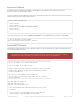
When you subscribe to a specific topic or topic filter, you also need to pass in a callback function that will be used to
handle any subscribe matches or events.
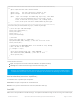
MQTT subscribe callback functions must have the following format:
You can subscribe to up to EIGHT (8) topics with the internal MQTT client.
The same callback handler can be used for multiple subscriptions, or you can use individual callbacks for
each subscribe. The choice will depend on your specific project.
© Adafruit Industries https://learn.adafruit.com/introducing-the-adafruit-wiced-feather-wifi Page 114 of 202