
Instruction Manual





DEMONSTRATION
MILLPWR
®
Operation Manual
4-18
Testing Your Program
It’s always a good idea to test the program before you cut a part.
• Press
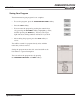
RUN OPTIONS and then select both the DRY RUN and
GRAPHICS ONLY softkeys.
• Move to the start of the program by pressing the
1 key
followed by the
ENTER key.
• Now press the GO key. Watch as MILLPWR shows how
the part will be cut.
• Before attempting to cut the part, press the
RUN OPTIONS
softkey and make sure the DRY RUN and GRAPHICS ONLY
keys are not selected.
• Now press the
DRY RUN and GRAPHICS ONLY softkeys
to de-select them.