
Instruction Manual





DEMONSTRATION
MILLPWR
®
Operation Manual
4-17
Saving Your Program
Your demonstration part program is now complete.
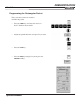
• To save the program, press the PROGRAM FUNCTIONS softkey.
• Press the SAVE softkey.
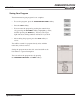
• You can name the program by pressing the numeric keys
or by pressing the
ALPHABET softkey, highlighting a letter,
and then pressing the ENTER key. You may select up to
eight characters, mixing numbers and letters if you wish.
• After naming the program, press the
SAVE softkey to
save it.
You will be warned if a program already exists with the
name that you have entered.
Saving the program means that it is stored and will not be
lost if there is a power interruption.
You can retrieve the program later by pressing
the
PROGRAM FUNCTIONS and LOAD softkeys.