
Instruction Manual





DEMONSTRATION
MILLPWR
®
Operation Manual
4-13
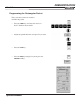
• Press the HOLES key and then press the BOLT CIRCLE softkey.
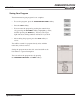
Notice that the
CENTER and DIRECTION are carried
forward from the arc that we programmed earlier. Leave
the depth of the holes alone and change the radius and enter
the number of holes.
• Arrow down to the “Radius” field and enter a
value of 0.75".
• Press the
CCW softkey for a counter-clockwise
direction.
• Enter a value of 5 for the number of holes.
• Press the
USE key.