
Instruction Manual





DEMONSTRATION
MILLPWR
®
Operation Manual
4-12
Notice how the lines next to the program steps have changed.
They now indicate that the contour is closed.
This happens when the “To” point of the last step is the same
as the “From” point of the first step.
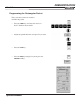
Programming the Bolthole Pattern
Begin by changing the tool.
• Press the TOOL key and enter 0.250" for the
diameter.
Again, skip the tool length.
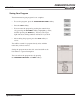
• In the
TOOL TYPE field, arrow down to DRILL and press
ENTER.
• Adjust the spindle direction and speed as needed.
• Press the
USE key.