
Instruction Manual



PROGRAM STEPS
MILLPWR
®
Operation Manual
Bolthole Circle Patterns
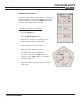
A bolthole circle pattern is defined by its center point,
radius and number of holes. You can program partial
bolthole patterns by pressing the
MORE softkey and
entering a start angle and an end angle.
T
o program a bolthole circle pattern:
• Press the HOLES key.
• Press the BOLT CIRCLE softkey.
• Enter the X- and Y-axes coordinates for the
bolthole circle pattern’s center point.
• Enter the depth of cut for the holes.
• Enter the radius of the hole pattern.
• For "Direction,” select the direction
you want to cut. Press the
CW softkey for
clockwise or the
CCW softkey for a counter-
clockwise direction.
• Enter the number of holes you want to include
in the circle.
5-31